
ComfyUI: the VFX artist's new toolbox?

ComfyUI in 2025: artificial intelligence enters the VFX artist's toolbox
A new interface for a new generation of images
In 2025, visual effects production pipelines don't look quite the same any more. At the heart of this transformation: ComfyUI, an open-source, fully modular interface that gives you complete control over image generation models such as Stable Diffusion, SDXL and ControlNet.
With its visual node approach, ComfyUI is unlike any other AI tool of the moment. It's aimed at technical artists, VFX supervisors and even directors looking for fast visualisation. It's Nuke for generative AI, and that changes everything.
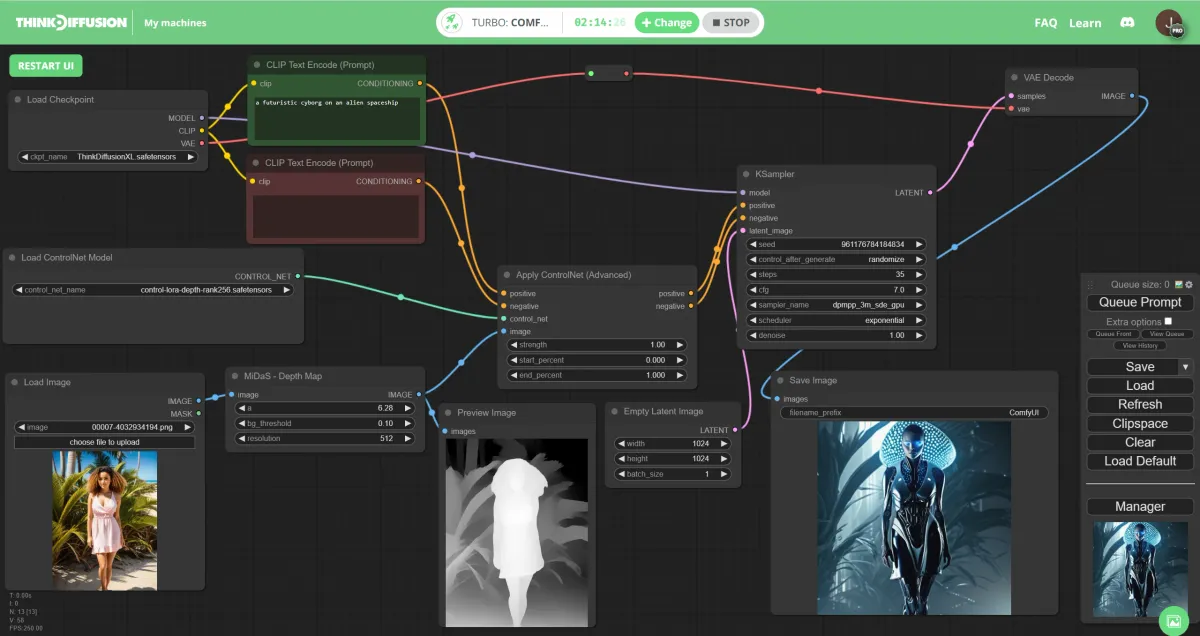
🧰 How does it work?
ComfyUI is node-based: each step of the process is represented visually by a block (a node), which you connect to the others. Generating an image, changing its lighting, injecting a human pose or interpolating between two renders is therefore done in a non-linear, modular way. You'll find more information on GitHub.
It's technical, yes. But that's also what gives surgical precision over the final render.
🛠️ A tool built for VFX studios?
ComfyUI isn't a geek gadget. It has already found its way, often discreetly, into several professional workflows:
🎨 Pre-production and concept art
ComfyUI can generate environments, costumes, characters or props in minutes. Useful for exploring worlds, setting an art direction or quickly testing a design.
🌍 Matte painting and set extensions
Artists can blend photography, digital painting and generative AI to extend a set, create a complex sky or simulate a large-scale futuristic city.
👗 Costume design and character variations
With custom LoRA models, stylists and character designers explore dozens of variations in record time.
🎞️ Exploratory animation
Some studios are starting to use AI interpolation to create mood transitions, shot simulations and even animated storyboards.
✅ Benefits for the industry
- Complete control over generation parameters.
- Reproducibility and consistency from one render to the next.
- Fast visual prototyping, ideal for pitches, pre-production or R&D.
- Modularity: works with every Stable Diffusion model.
- Lower cost: runs locally, with no cloud subscription.
✅ ComfyUI: strengths and limits
ComfyUI is an impressive step forward in AI image generation, but let's keep our feet on the ground: there's nothing magic about it. Using it effectively runs into several significant constraints.
First, the hardware requirements are substantial. To get the most out of ComfyUI, be ready to invest in a GPU with 12 to 24 GB of VRAM — a prerequisite that puts the tool out of reach for many creators. Fortunately, thanks to sites like Think Diffusion, you can use the full potential of Stable Diffusion online through cloud services. No technical skills required: everything is pre-installed and automated, including popular extensions such as ControlNet, Deforum, LoRA or Roop, and the best-known interfaces such as Automatic1111, ComfyUI, Fooocus or Forge.
The node-based interface, while flexible, has a particularly steep learning curve. Beginners will need patience and plenty of trial and error before getting the results they want.
More fundamentally, AI lacks real semantic understanding. It doesn't truly "understand" what it generates; it simply imitates patterns found in its training data. Users therefore need to know how to guide it precisely.
Finally, the essential point: ComfyUI is an assistant, not a replacement. Creativity, artistic vision and aesthetic judgement remain human territory. The tool amplifies our abilities without replacing our creative sensitivity.
🚀 What's new in 2025: faster, smoother, more professional
Since the start of the year, ComfyUI has had a series of major updates that firmly move it into the big leagues:
- Native SDXL Turbo support: ultra-fast generation, usable for frame-by-frame animation and video.
- Multi-ControlNet support: to guide generation with poses, depth maps, sketches or normal maps.
- Simplified installation with ComfyUI Manager: load models, upscalers, LoRAs or extensions in one click. To find more models, CIVITAI is a go-to reference.
- Video nodes and smooth interpolation: the gateway to stylised shots and animated concepts.
- Real-time preview at every step of the workflow.
In other words: ComfyUI has left the nerds' garage and entered the studios.
🎯 In conclusion: one more building block in the image factory
ComfyUI is today one of the most interesting, flexible and powerful AI tools available for free. It gives artists great freedom to experiment, but in return it demands technical skills, a clear art direction and a real eye for detail.
In a well-designed pipeline, it's an accelerator. In the wrong hands, it remains a black box. As always, it's not the tool that matters, but what you do with it.