
Ageing an actor after the shoot
Five seconds of footage, a woman in her thirties, and the same scene forty years later. One aged reference image, then a video model that keeps the performance, the framing and the light.
- Type
- ComfyUI workflow
- Status
- R&D
- Updated
- November 27, 2026
- Stack
- Qwen Image 2.1 EditMiniMax H3 Max RecastComfy CloudFFmpeg
The problem
A flash-forward, a "forty years later" scene, a character who lives a whole life on screen: on set, that means make-up, prosthetics or a second actor. Ageing someone afterwards, in post, used to take weeks of shot-by-shot VFX. And running an image model frame by frame does not work: wrinkles appear and vanish, the face changes from one frame to the next.
The method: age one image, then propagate
- Pick the shot: 5 seconds of 1080p footage, face almost frontal, little head rotation. A woman in her thirties, a magnolia flower, late-afternoon backlight.
- Age a single image: one frame goes through Qwen Image 2.1 Edit on Comfy Cloud, with a precise brief (around 70, silver hair in the same braids, forehead lines, crow's feet, nasolabial folds, aged neck and hands) and everything else locked: identity, glasses, t-shirt, pose, light, background. You sign this image off like a make-up test.
- Propagate to the video: MiniMax H3 Max Recast takes the footage and the reference image. It replaces the person with her aged version while keeping the original motion, gestures, framing, camera and light. 1080p output, realism option on.
- Cut the before/after: a wipe and a side-by-side assembled with FFmpeg.
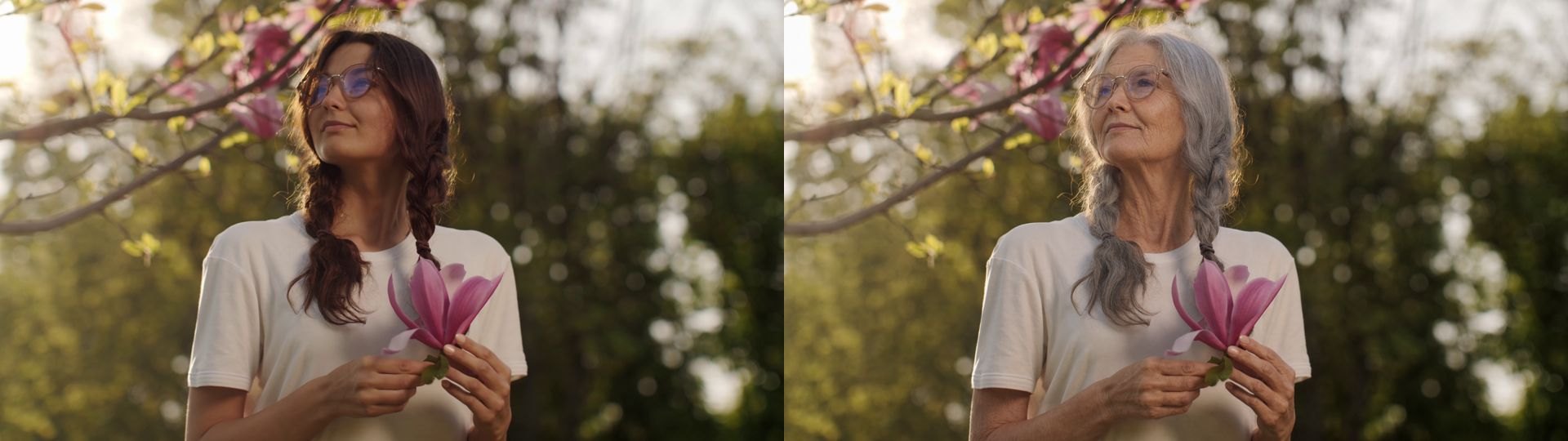
The result
Across the five seconds, the face, neck and hands age consistently, with no flicker. The performance, the head moves, the flower in her fingers, the backlight and the background blur are those of the original take.
Takeaways
- Everything hinges on the reference image. That is what you retouch, get approved and reuse for every shot in the sequence. The video model only propagates it.
- The template trap: Comfy's Qwen Image 2.1 Edit template was sending its own demo instruction instead of mine. The first attempts aged nothing. The prompt had to be wired straight into the encoder.
- One photo per person: Recast expects one reference image per person to replace. Two pictures of the same woman are read as two people.
- For a professional shot, the AI result becomes a working plate: track the head, comp the aged face over the original plate in Nuke or After Effects, match grain and grade, and conform the frame rate (the output is 24 fps).
- Cost: about 680 Comfy Cloud credits for 5 seconds in 1080p, plus a few GPU minutes for the image. Compare that with a day of prosthetic make-up or weeks of VFX.